


Blog
From Dispatch to Invoice in Minutes: The Business Central Field Service Integration Built for Serious Service Companies
Written by
Tim Tucker /  May 26, 2026


Summary
Disconnected dispatch, field service, inventory, and billing systems cause delays, errors, and poor customer experience due to lack of real-time updates. This blog explains how integrating Business Central with Microsoft Dynamics 365 Field Service unifies scheduling, work orders, inventory, and financials into a single connected system.
Your dispatcher books a job. Your technician completes it. Your billing team finds out three days later. By then, the parts are gone from the van, the invoice is late, and the customer is already frustrated.
This is the daily reality for service companies that are still running on disconnected systems. Dispatch lives in one tool. Billing sits in another. Inventory and parts usage are updated with delays between the field and back-office systems. Every gap between those systems costs you time, money, and customer trust.
The Business Central Field Service integration closes all of it. Scheduling, work orders, technician mobility, inventory, and financials operate inside one connected platform. The moment a technician updates a job in the field, your back office knows about it.
Service companies across North America are scaling fast, and the ones pulling ahead are built on connected field service and finance ERP North America infrastructure. This blog explains how Business Central and Field Service work together, and how connected operations help service companies improve efficiency, profitability, and customer satisfaction.
What Each System Does (and Why Neither is Enough Alone)
Microsoft Dynamics 365 Field Service and Microsoft Dynamics 365 Business Central are built for different parts of the service lifecycle, but they are designed to work as one connected system.
Field Service: Managing Work in the Field
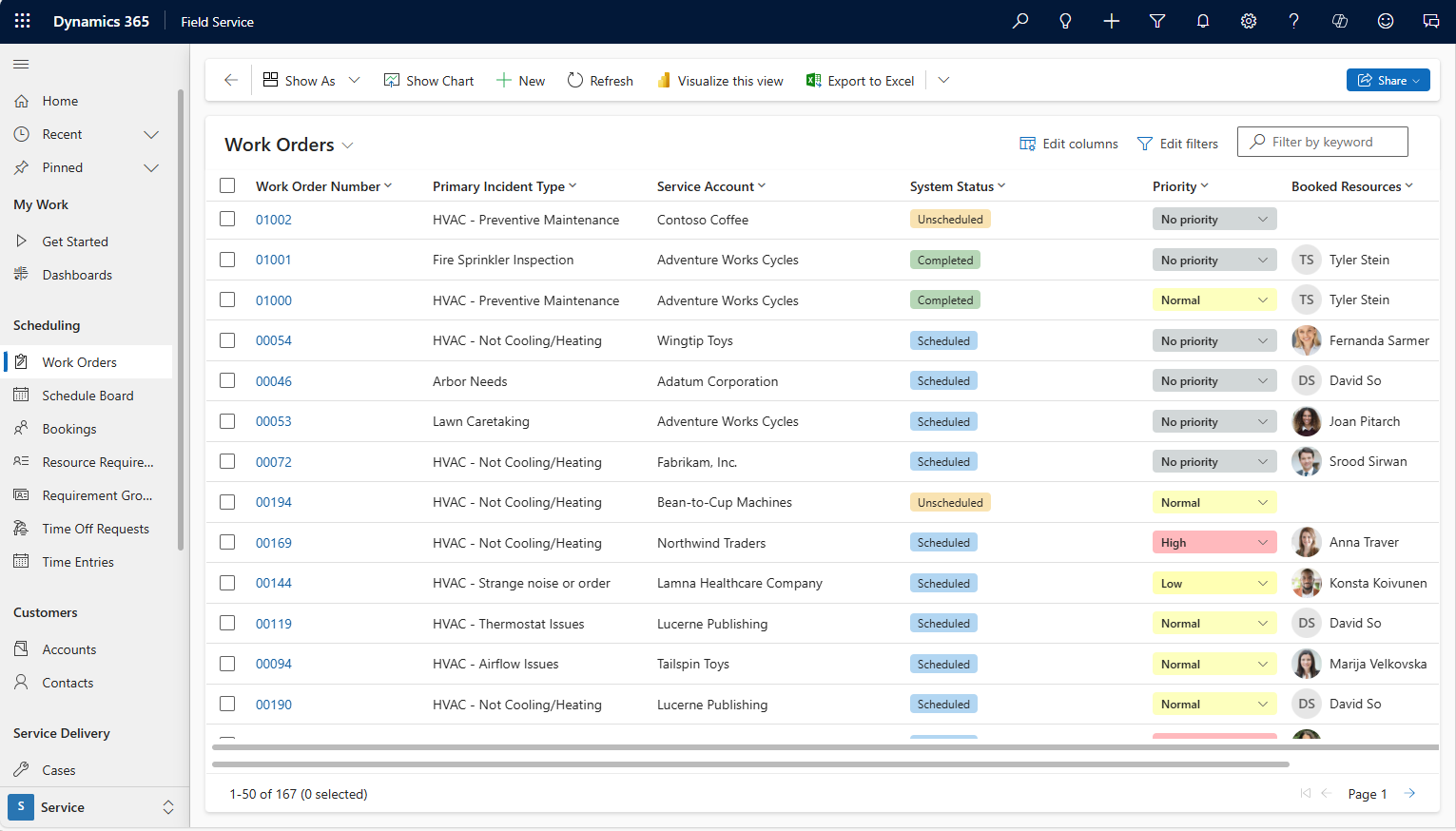
Microsoft Dynamics 365 Field Service supports the end-to-end management of field operations, including work orders, technician scheduling, and on-site service execution.
It enables dispatch teams to assign and manage jobs efficiently while providing technicians with access to job details, service history, and required updates during fieldwork. Scheduling can be enhanced with intelligent capabilities such as Copilot-assisted dispatch, depending on configuration.
The platform also supports service agreements, mobile field updates, and customer communication workflows, helping organizations improve coordination and visibility across field operations.
Business Central: Managing the Back Office
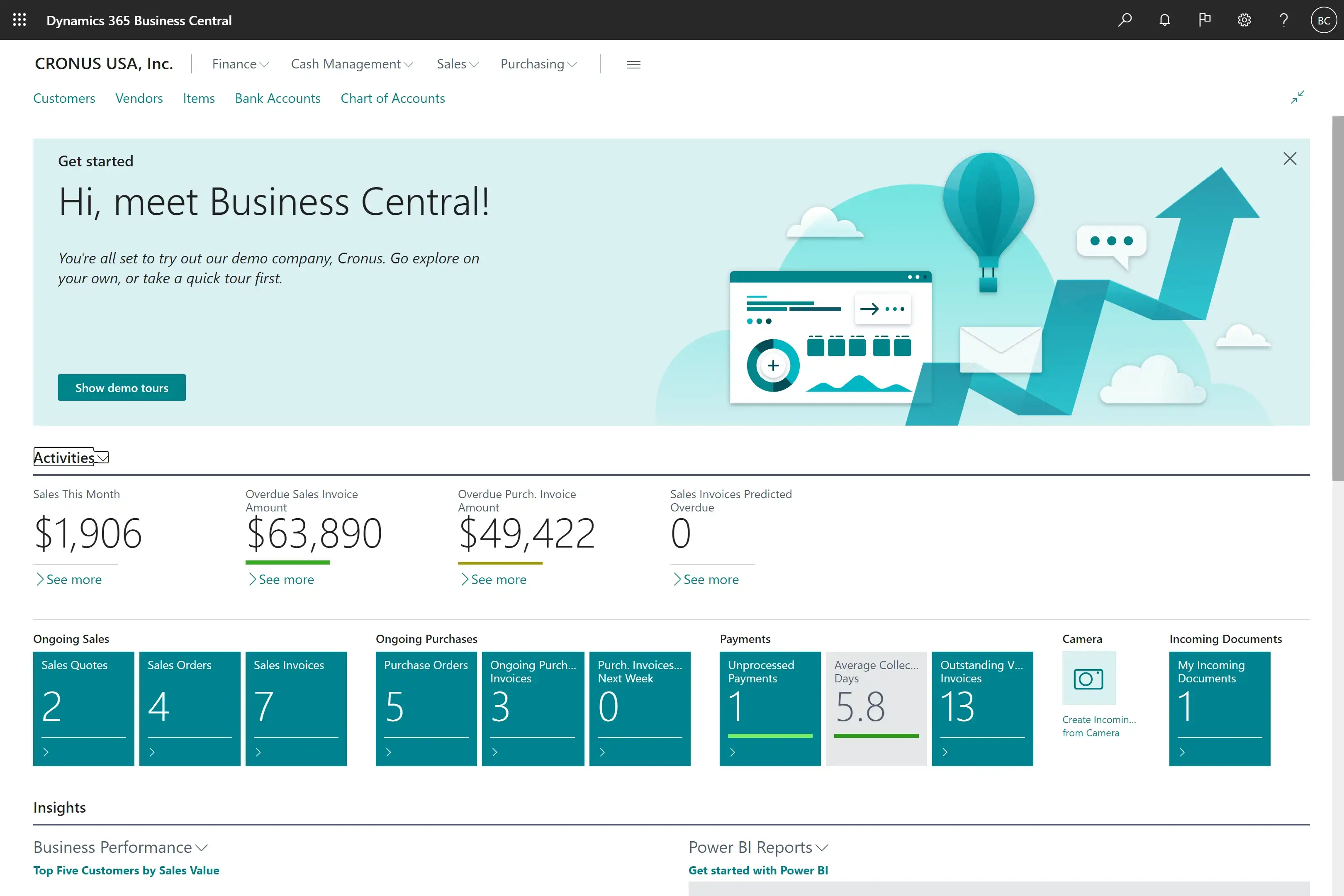
Microsoft Dynamics 365 Business Central manages everything behind the scenes. It controls financial, inventory, purchasing, billing, project accounting, and reporting. It acts as the ERP backbone that converts field activity into financial records and operational data into business insight.
The Problem When Systems Work in Silos
The challenge appears when these systems run in isolation. Field activity does not automatically reflect in financials. Inventory becomes inaccurate after multiple jobs. Billing depends on manual updates instead of real-time job completion. Finance teams end up working with delayed or incomplete data.
Why Neither System is Enough Alone
On their own, neither system solves the full problem. The real value comes from integrating Business Central and Field Service into a single, connected workflow where operations and finance stay continuously in sync.
How the Business Central Field Service Integration Actually Works
Most integrations move data in one direction, with a delay, through middleware that often breaks when processes change. The integration between Microsoft Dynamics 365 Field Service and Microsoft Dynamics 365 Business Central works differently. It creates a live, bi-directional connection between field operations and financial systems.
Here is what that looks like in practice:
1. Work Orders Flow Directly into the ERP
When a work order is created in Microsoft Dynamics 365 Field Service, it automatically syncs with the corresponding customer and project or service order data in Microsoft Dynamics 365 Business Central. This removes duplicate entries and ensures every field activity is immediately reflected in the financial system.
2. Inventory Updates in Real Time
When technicians consume parts on-site, inventory is updated instantly in Business Central. This eliminates manual reconciliation, reduces stock discrepancies, and ensures accurate van and warehouse visibility at all times.
3. Job Costs Post as Work Happens
Labor hours, travel time, and material usage are recorded directly into Business Central job costing modules as work is performed. Finance teams gain real-time visibility in margins instead of waiting for end-of-cycle updates.
4. Invoicing Triggers Automatically on Job Completion
Once a technician marks a job as complete in Field Service, invoicing is automatically initiated in Business Central. This significantly reduces billing delays and improves cash flow cycles.
5. Intelligent Dispatch Feeds Financial Accuracy
AI-powered scheduling assigns technicians based on skills, location, and parts availability. These assignments flow into Business Central, ensuring job costing and resource allocation reflect actual field decisions.
6. A Connected Microsoft Ecosystem, Not a Patchwork Integration
This integration is built on Microsoft’s native platform capabilities and Power Platform infrastructure, reducing dependency on custom middleware. The result is fewer failure points, easier maintenance, and a single connected system for field service and finance.
Key Benefits for Service Companies
The integration between Microsoft Dynamics 365 Field Service and Microsoft Dynamics 365 Business Central goes beyond system connectivity. It converts every field activity into a real-time financial outcome, giving service companies continuous operational and financial visibility.
1. Real-Time Job Costing
You no longer wait until month-end to understand job profitability. Labor, materials, and travel costs flow into Business Central as work is performed. Managers gain real-time visibility into margins by job, technician, and customer, enabling them to make corrections while work is still in progress.
2. Accurate Inventory Across Every Location
Lot and serial number tracking remains intact as parts move from the warehouse to the technician van to the customer site. When technicians record usage in Field Service, inventory is updated immediately in Business Central. This ensures purchasing decisions are based on actual stock levels, not estimates or delayed reports.
3. Faster Cash Flow
Invoices are triggered automatically when a work order is completed. Billing teams no longer chase paperwork or manual updates. The system significantly reduces the time between job completion and invoicing, enhancing cash flow without increasing operational effort.
4. Contract and Agreement Control Without Revenue Leakage
Recurring service agreements created in Field Service connect directly to financial processes in Business Central. Financial records reflect each visit, billable action, and renewal event, ensuring consistent revenue recognition and minimizing leakage between field execution and accounting.
5. One Source of Truth Across Teams
Finance, dispatch, and field teams operate with the same real-time data. Month-end close becomes a verification exercise rather than a reconciliation effort. A single system of record minimizes disputes over job completion, billing accuracy, or service delivery.
6. A Platform That Scales with Your Operations
As technicians are added, new regions are opened, or service lines expand; the system scales without requiring new integrations or infrastructure changes. The connected Field Service and Business Central environment grows with the business at the platform level, not through custom workarounds.
Why Rival Systems Fail to Deliver True End-to-End Visibility
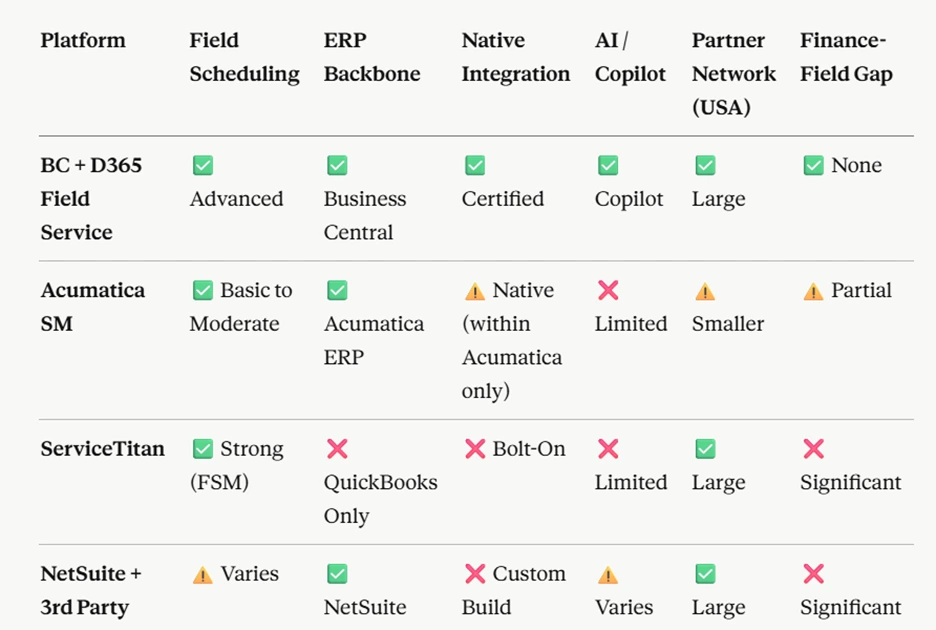
Not all platforms successfully connect field operations with financial management. Most service organizations end up working with partially integrated tools that still leave gaps between dispatch, execution, and accounting.
Here’s how the integration between Microsoft Dynamics 365 Field Service and Microsoft Dynamics 365 Business Central compares with the alternatives commonly used by service companies in North America:
Is This the Right Fit for Your Business?
1. Service Companies with Growing Field Operations
This solution is ideal for businesses with 10–200+ technicians managing recurring contracts, multi-site work, or serialized equipment.
2. Teams Struggling with Disconnected Systems
If you’re relying on spreadsheets, standalone field service tools, or QuickBooks and facing delays, duplicate data, or limited visibility, you’re likely hitting system limitations.
3. Common Industries
HVAC, facilities management, elevator services, industrial maintenance, medical equipment servicing, and commercial property services.
4. Microsoft Ecosystem Users
Best suited for companies already using Microsoft 365, Teams, or Power BI and looking to extend their environment without introducing a disconnected platform.
5. Mid-Market Companies in the US and Canada
Organizations scaling beyond manual processes and seeking connected field service and finance ERP capabilities without the complexity of enterprise-level systems.
Final Thoughts
Business Central–Field Service integration eliminates the gap between your field operations and your back office. Work orders become financial records. Technician activity becomes real-time margin data. Service contracts become recognized revenue. All of it happens automatically, without manual intervention, spreadsheet exports, or reconciliation at the end of the month.
Unlike other solutions that bolt field service onto an ERP or leave financial management to QuickBooks, this platform is a certified, AI-powered, single-vendor solution built to scale with your service business across North America.
The gap between your field and your finances has a fix. Let us show you how it works.
Book a live demo and see how dispatch, inventory, and invoicing operate together in real time.
FAQs
No. The Business Central Field Service integration is designed to connect existing systems rather than require a full replacement. In many cases, organizations can extend their current Microsoft environment without disrupting ongoing operations.
Implementation depends on the current system landscape and business complexity. Since both solutions are part of the Microsoft ecosystem, integration is more structured and predictable compared to custom-built connectors. Most organizations adopt a phased rollout to minimize operational disruption.
While outcomes vary, companies typically experience faster billing cycles, improved job profitability visibility, and reduced revenue leakage. A connected field service and finance ERP North America approach improves real-time decision-making and helps strengthen overall margin control.
No. When implemented correctly, the rollout is designed to run alongside existing processes before full transition. The goal is to ensure continuity in dispatching, service delivery, and billing while gradually enabling real-time data flow between systems.
Yes. The Microsoft Field Service ERP integration in USA organizations is built to scale across multiple regions, entities, and service lines. It supports centralized financial visibility while allowing distributed field execution.
Categories
- Upgrade
- United States
- United Arab Emirates
- Retail
- Power BI
- Partner Program
- Migration
- Microsoft Dynamics 365 Finance and Operations
- Microsoft 365 Copilot
- job costing software for electrical contractors
- Industry Updates And Events
- Implementation
- Finance and Operations
- Dynamics SL
- Dynamics NAV
- Dynamics GP
- Dynamics Business Central
- Dynamics 365 for Sales
- Dynamics 365 Field Service
- Dynamics 365 Customer Service
- Dynamics 365
- CRM and ERP
- Construction365
- Cloud Migration
- Canada
- Australia
- Artificial Intelligence
- AI Agents in Business
Recent Posts
- Frontier Transformation in Retail: When AI Moves from Insight to Action
- AI Agents in Microsoft 365 Copilot: The Future of Intelligent Business Automation
- Price Hiked, Value Locked: The Guide to Business Central Pricing in Australia
- Top Business Central Features Middle East SMEs Are Using to Pull Ahead
- Stop Paying the “On-Prem Tax”: Why Australian SMEs are Pivoting to Business Central SaaS in 2026