



Dynamics NAV to Business Central Upgrade & Migration in Australia
When Dynamics NAV starts holding your business back, Business Central moves you forward.
Upgrading from Dynamics NAV to Dynamics 365 Business Central moves your business to a modern, secure, cloud-based ERP. As a trusted Australian NAV migration partner, we ensure a smooth, low-risk transition with minimal operational disruption.
Successful Projects
Team Members
Locations
Years in Business
Leading NAV Upgrade Partner in Australia with Expertise across all Microsoft Technologies
We hold comprehensive Microsoft Solutions Partner designations across all key areas, demonstrating our expertise and commitment to delivering world-class solutions.

Why Australian Businesses Are Upgrading from NAV to Business Central
Dynamics NAV no longer receives meaningful functional innovation from Microsoft. As a result, businesses running NAV are locked into a legacy platform while competitors benefit from continuous enhancements delivered through Business Central’s cloud-first model. This innovation gap directly impacts operational efficiency and decision-making.
Business Central ensures ongoing access to new features, regulatory updates, and performance improvements, —without disruptive upgrade cycles.
Legacy NAV environments receive limited security updates, increasing exposure to cyber threats, unauthorised access, and compliance risks. This is especially critical for Australian businesses handling financial, payroll, and customer data.
Business Central delivers enterprise-grade security, role-based access, audit trails, and Microsoft-managed cloud protection—helping organisations reduce risk while meeting governance expectations.
Maintaining NAV on-premise requires servers, upgrades, backups, patching, and dedicated IT support. Over time, these costs continue to rise while delivering diminishing value.
By moving to Business Central, organisations shift to a predictable subscription model, reduce infrastructure dependency, and free IT teams to focus on strategic initiatives instead of system maintenance.
NAV was not built for today’s hybrid and remote work environments. Expanding users, locations, or business units often requires costly infrastructure upgrades and complex configurations.
Business Central provides secure, anytime-anywhere access and scales seamlessly as the organisation grows—supporting multi-entity, multi-location, and future expansion strategies.
Many NAV environments operate alongside disconnected systems, resulting in fragmented data and delayed reporting. This limits executives’ ability to make fast, informed decisions.
Business Central unifies finance, operations, and reporting, delivering real-time insights through embedded dashboards and Power BI—enabling proactive, data-driven leadership.
Australian organisations are increasingly aligning with cloud-first strategies to improve agility, resilience, and innovation. NAV’s architecture limits the ability to fully participate in modern digital ecosystems.
Business Central acts as a foundation for digital transformation, integrating seamlessly with Microsoft 365, Power Platform, Teams, and Azure—future-proofing ERP investments.
Dynamics NAV to Business Central Upgrade Challenges
Upgrading from Microsoft Dynamics NAV to Dynamics 365 Business Central is not a simple version change. For Australian mid-sized organisations, the transition involves technical, operational, and governance-level challenges that must be clearly understood before execution.
Legacy Data Complexity
Inconsistent and outdated NAV data complicates clean migration
Heavy NAV Customisations
Deep legacy custom code increases upgrade risk
Code Conversion
C/AL customisations must be rebuilt as AL extensions
Third-Party Add-Ons
Existing integrations may not be Business Central–ready
Process Alignment
Legacy workflows may not fit modern Business Central standards
Business Disruption Risk
Poor planning can impact operations during transition
Business Benefits of Upgrading NAV to Business Central
Upgrading to Business Central eliminates the need for on-premise servers and reduces ongoing IT maintenance, upgrades, and support costs. With a predictable subscription model, businesses gain better cost control while shifting IT spend from infrastructure management to strategic growth initiatives.
Business Central provides instant access to cash flow, profitability, budgets, and forecasts through real-time dashboards. Executives can make faster, data-driven decisions with secure access to insights anytime, anywhere.
Business Central is designed to support Australian regulatory requirements, including GST-ready financials, local tax structures, audit trails, and compliant financial reporting—helping organisations reduce risk and maintain governance with confidence.
Native integration with Microsoft 365, Power BI, and Azure enables teams to work more efficiently within familiar tools. Financial data flows seamlessly across systems, improving collaboration, reporting accuracy, and productivity.
Business Central scales effortlessly as your business grows, allowing you to add users, modules, and functionality without re-implementing ERP. This ensures your system evolves alongside your organisation’s expansion and strategic goals
Free NAV Upgrade Assessment
Talk to an Upgrade Expert
See the Total Economic Impact™ of Upgrading from Dynamics NAV to Business Central
Microsoft research highlights how organisations benefit from lower IT costs, improved productivity, and stronger ROI after moving from NAV to Business Central.2
Read the study265%
ROI with Business Central over 3 years
Less than 6 months
Payback on investment
Up to 12.5%
Productivity improvement for finance and operations staff
Dynamics NAV vs Business Central: Key Differences
| Area | Dynamics NAV | Business Central |
|---|---|---|
| Deployment | Mostly on-premise | Cloud, Hybrid, On-Prem |
| Updates | Manual, infrequent | Automatic & continuous |
| Security | Infrastructure-dependent | Enterprise-grade cloud security |
| Reporting | Limited, static | Real-time insights with Power BI |
| Integration | Custom, complex | Native Microsoft ecosystem |
| Scalability | Costly | Flexible, pay-as-you-grow |
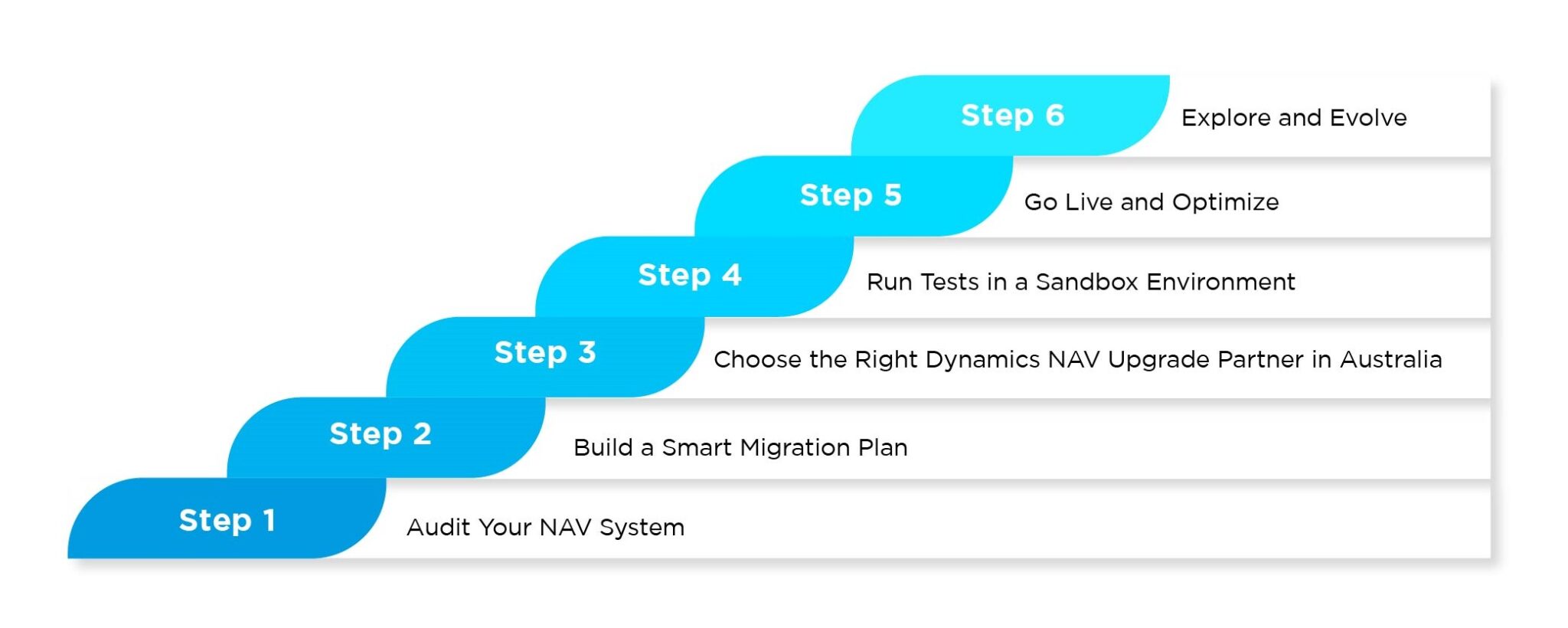
Dynamic NAV to Business Central Upgrade: A Pratical Roadmap
ERP Migration Experience Across Industries
We help mid-sized Australian businesses modernise their ERP with Dynamics NAV to Business Central migration tailored to industry-specific processes, compliance requirements, and growth objectives—ensuring practical outcomes, not generic implementations.


Top Enterprises Trust DynamicsSmartz for Digital Transformation




Why Choose DynamicsSmartz as Your NAV Upgrade Partner?
DynamicsSmartz combines deep Dynamics NAV expertise with proven Business Central upgrade frameworks to deliver a low-risk, well-governed upgrade—ensuring minimal disruption, clear timelines, and measurable business value.
- Microsoft Solutions Partner
- 26+ Years ERP Experience
- Local Australian Expertise
- Australia compliance ready
- Proven upgrade frameworks
- Transparent Pricing & Support


Start Your NAV Upgrade Journey Today
If your organisation is running Dynamics NAV, now is the right time to plan your Business Central migration—before legacy risks impact growth, security, or compliance.
Book A Session
Latest News


Work with a Trusted Microsoft Solutions Partner
Please fill out the form or send us an email to [email protected]
FAQs - Dynamics NAV to Business Central Upgrade
All major versions—from NAV 2009, NAV 2013, NAV 2015, NAV 2016, NAV 2017, to NAV 2018—can be upgraded to Business Central. Older versions may require a phased or multi-step upgrade, especially if heavily customised.
NAV can still operate, but Microsoft’s innovation, security updates, and product roadmap are now focused entirely on Business Central—making upgrade a strategic necessity.
Business Central is cloud-first, continuously updated, more secure, and deeply integrated with Microsoft 365, Power BI, and Azure.
Typically 8–16 weeks, depending on NAV version, data volume, customisations, and third-party integrations.
Yes. Master data, open transactions, and required historical data are migrated after data cleansing and validation.



Download Your
Free Whitepaper
Download a Free Copy of Our Latest Whitepaper 'The Definitive Guide to Digital Transformation with Dynamics 365'