

Blog
Construction ERP in 2026: How to Choose the Right Fit (Without Costly Mistakes)
Written by
Tim Tucker /  February 19, 2026


Summary
In 2026, the risk isn’t whether you have ERP; it’s whether your construction ERP truly fits your workflows. As project complexity increases, misaligned systems lead to delayed job cost visibility, margin erosion, and forecasting gaps. This guide helps construction finance and IT leaders evaluate ERP fit with a structured, risk-aware approach.
The global construction software market size was valued at $10.76B in 2025 and projected to grow to $24.72B by 2034, reflecting steady long-term growth.
North America alone accounts for 42.5% of the global market share, making it one of the most mature ERP environments worldwide.
What this tells us:
- ERP adoption is already widespread.
- Investment is increasing.
- The real differentiator is alignment.
For most construction SMBs across North America, the question is no longer “Do we need ERP?”
It’s “Is our ERP truly built for how we operate?”
In an industry where average net margins often range between 3–6%, even small delays in cost visibility or change order tracking can significantly impact profitability.
Why “Fit” Matters More Than Features
When ERP systems don’t align with construction workflows, the impact shows up in day-to-day operations, resulting in limited project visibility, manual workarounds, and delayed financial insight. These issues often emerge gradually, especially as projects scale.
Let’s examine where ERP fit makes the biggest difference.
1. Unified Project & Financial Visibility
Construction firms often use different systems for job management, procurement control, and accounting. When systems are disconnected, leaders will not have a unified and real-time view of project performance and financial reporting, making it challenging to make informed decisions promptly.
How the Right Construction ERP improves Visibility:
A well-aligned construction management ERP software:
- Links budgets, commitments, and actuals in real time
- Connects change orders directly to financial reporting
- Provides live job cost and profitability visibility
- Eliminates duplicate data entry
2. Labor Compliance & Multi-State Complexity
Managing labor regulations manually is challenging, especially if a construction firm is operating in multiple countries. The labor regulations, such as certified payroll, prevailing wage rules, and union requirements, will be different in each country and change periodically.
Consequently, overseeing it manually leads to payroll errors, penalties, and avoidable project disruption.
How Construction Management ERP Software Simplifies Labor Compliance:
Construction-ready ERP systems automate labor classifications, payroll calculations, and compliance reporting, reducing audit exposure and operational strain.
3. Change Order Control & Margin Protection
When change orders are updated on different systems and not synced with other systems, it causes a delay in capturing their impact on finance. Additionally, it creates a gap between project execution and financial reporting.
How Construction Management ERP Software Protects Margins:
A construction-specific ERP automatically syncs change orders to:
- Budgets
- Billing schedules
- Forecasts
- Revenue recognition
This protects margins before erosion becomes visible.
4. Legacy Systems & Limited Automation
Many construction companies still use legacy systems for construction projects, including project tracking, accounting, and field tools.
These systems don’t sync with each other and fall short in automating the construction workflows, requiring manual updates. This disconnect shows up in delayed approvals, rework, and a higher risk of errors.
How Construction Management ERP Software Replaces Legacy Systems:
Modern construction ERP software automates:
- Workflow approvals
- Budget revisions
- Commitment tracking
- Revenue recognition
Reducing manual intervention lowers both error rates and operational friction.
5. Subcontractor Cost & Commitment Visibility
Tracking subcontractor contracts, compliance documents, billing, and payments is often complex and time-consuming. Without centralized oversight, maintaining control across subcontractor relationships becomes difficult.
How Construction ERP Software Manages Subcontractors:
A construction ERP centralizes subcontractor data in one system, improving coordination, compliance tracking, and payment accuracy.
Understanding why ERP fit matters is only the starting point. The next step is knowing how to evaluate that fit when selecting a system.
Evaluate Construction ERP Fit in 2026
Before selecting a system, ask yourself these questions to evaluate construction ERP software.
1. Does It Create a Single Source of Truth?
The right construction ERP software unifies the disconnected systems, bringing project execution, financial, and field operations on a centralized platform. In this manner, construction firms have a single source of truth to track everything, including:
- Project progress
- Labor productivity
- Material tracking
- Cash flow forecasting
If updates are captured once, they will reflect instantly in job costing, budgets, billing, and forecasts. This unified view provides leaders with real-time cost visibility, helps track margins and cash flow accurately, and eliminates delays caused by spreadsheets, duplicate entries, and disconnected systems.
2. Can it Scale with Project Growth?
An adequate construction ERP software doesn’t break down when your project scales in terms of size and complexity. Instead, it seamlessly scales and manages the following:
- Multiple jobs at the same time
- Different subcontractor commitments
- Financials across all active projects
- Detailed job costing
- Numerous simultaneous users
On top of that, cloud-based deployment strengthens the scalability by adapting business demand in real time, supporting large datasets, and enabling the team to access the system from anywhere. This ensures that as your construction portfolio expands, the ERP continues to deliver real-time visibility, accurate financial tracking, and reliable performance across all projects.
3. Does the Vendor have Proven Construction Expertise?
When evaluating an ERP, the vendor’s construction-specific experience and long-term support are important. Here are critical things to remember while shortlisting vendors:
- Construction expertise: Understands industry-specific workflows and compliance needs.
- Proven experience: Have successfully deployed ERPs across multiple construction projects.
- Tailored solution: Offers an ISV-built platform designed for construction-specific needs.
- Long-term support: Provides reliable assistance during ERP implementation and post-go-live to ensure smooth operations.
- Innovation & AI readiness: Leverages AI and advanced technologies to improve forecasting, automation, and insights, keeping the ERP aligned with evolving business needs.
4. Is it Usable for Back-Office and Field Teams?
Both office teams and field staff rely on construction ERP software. Therefore, it must not have a complex interface, as it will lead to a long learning curve, slow adoption, increased errors, and delayed project and financial updates.
The right ERP solution offers a minimal and intuitive UI and straightforward navigation, making it easy to use for field teams. As a result, training time gets reduced, and data flows quickly and accurately across projects, budgets, and reporting.
5. Is Integration & Security Built In?
The ERP software for construction shouldn’t work in silos. It must support integration with project management, payroll systems, tax & financial solutions, and procurement & expenses. Robust integration ensures that data flows automatically across systems, reducing errors, duplicate entries, and delays.
Additionally, construction firms manage critical financial and project-related data, making them a high target of cyber-attacks. That’s why ERP should have built-in security features:
- Multi-factor authentication
- Role-based access
- High-level encryption
- Compliance with industry regulations
6. What is the Total Cost of Ownership Over Time?
The total cost of ownership (TCO) goes beyond the upfront ERP price. It includes
- Software licensing or subscriptions
- Implementation
- Integrations
- Training
- Ongoing support
- Future upgrades
For construction firms, these costs depend on project complexity, the number of users, and how much customization the system requires.
Construction-focused ERPs often lower long-term costs by reducing custom work and manual processes, while generic systems can increase expenses over time. Evaluating TCO early helps avoid budget surprises and ensures the ERP delivers value as the business scales.
These criteria set the foundation. The next question is how to move through the selection process without introducing new risk.
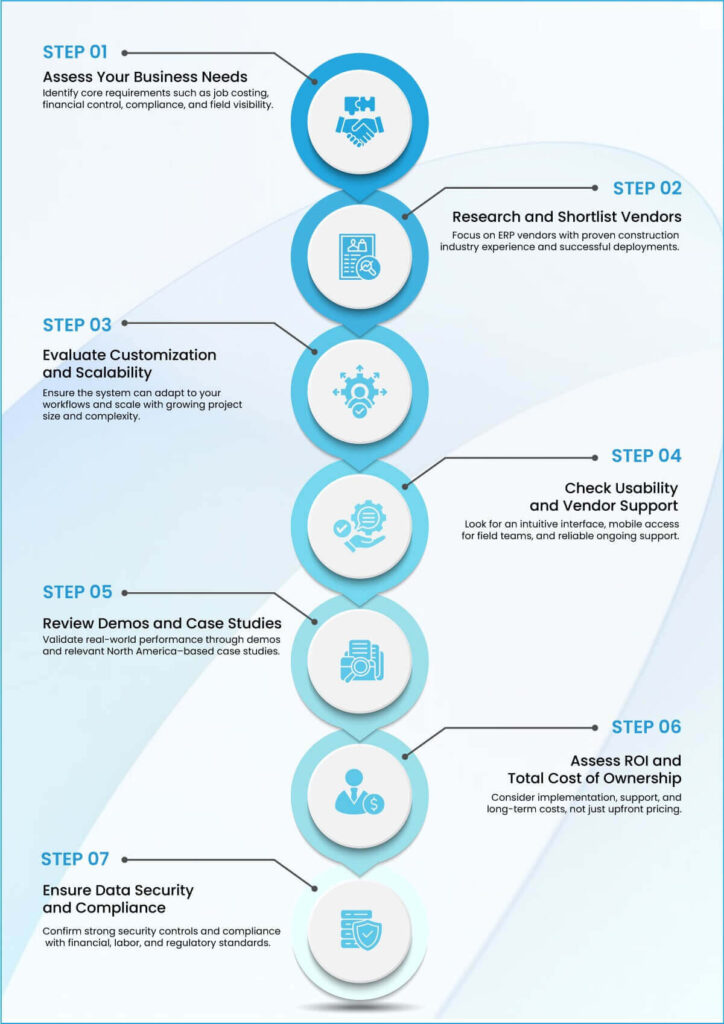
A Structured ERP Selection Framework
Here’s a step-by-step process for selecting the right construction ERP software:
Final Thoughts
For construction firms navigating ERP decisions, the question is no longer whether modernization is necessary, but how to approach it thoughtfully. In a mature market where ERP adoption is already the norm, misalignment, not inaction, creates the greatest risk.
Construction-focused solutions like ProjectPro, built specifically for end-to-end construction workflows on Microsoft Dynamics 365 Business Central, reflect the shift toward systems designed for real project, financial, and field requirements.
Choosing a solution with this level of alignment helps firms maintain control, reduce operational friction, and support steady growth over the long term.
Looking to evaluate ERP fit for your construction workflows? Let’s connect.
FAQs
The best software fits construction workflows like job costing, project controls, and compliance. It should connect field, project, and financial data in one system.
A construction ERP manages projects, finances, labor, and materials together. It gives real-time visibility across the entire project lifecycle.
Generic ERPs miss construction-specific needs like change orders and job costing. Industry-built systems reduce workarounds and manual processes.
When systems don’t scale, data stays disconnected, or visibility comes too late. That’s when ERP fit becomes a business risk.
Categories
- United Arab Emirates
- Retail
- Microsoft Dynamics 365 Finance and Operations
- Finance and Operations
- Dynamics Business Central
- Dynamics 365
- Construction365
- Artificial Intelligence
Recent Posts
- Frontier Transformation in Retail: When AI Moves from Insight to Action
- Top Business Central Features Middle East SMEs Are Using to Pull Ahead
- Retail at the Speed of Now: Overcoming Legacy Limits with D365 Finance & Supply Chain Management
- Getting Real Value from Dynamics 365 F&SCM: Smart ROI Strategies for UAE Retail Businesses
- Beyond Out-of-Stock: The Real Cost of “Blind” Inventory for UAE Retail Brands