

Blog
AI Agents in Microsoft 365 Copilot: The Future of Intelligent Business Automation
Written by
Nipun Thakur /  June 2, 2026


Your team is drowning in tasks that should not require human attention. Chasing approvals, updating CRM records, drafting repetitive follow-up emails, and coordinating meetings continue to consume hours each week. This is not a people problem. It is a systems problem.
Work is changing fast, and the businesses gaining an edge are not simply working harder. They are working with smarter systems. Microsoft 365 Copilot AI agents are changing how teams operate by bringing automation directly into the tools employees already use every day, including Teams, Outlook, SharePoint, and Dynamics 365.
Here is what makes this shift different. Copilot is evolving from an assistant that answers questions into a system that can take action. AI agents can retrieve information, trigger workflows, draft communications, update records, and coordinate tasks across Microsoft applications with far less manual effort.
In this guide, we break down what Microsoft 365 Copilot AI agents are, which use cases matter most for businesses, and how organizations can start adopting them today.
What Are AI Agents in Microsoft 365 Copilot?
AI agents in Microsoft 365 Copilot are specialized systems built to handle specific jobs inside your business. They do not just answer questions. They act. An agent can pull live data from your CRM, summarize a case, send a follow-up email, or update a record, all without a human stepping in to connect the dots.
Microsoft offers two types:
- Declarative Agents: Work within Microsoft 365 Copilot’s existing AI infrastructure. You configure them using your own organizational data, including SharePoint, Teams, and Dynamics 365, and they apply that knowledge to automate tasks within your security and compliance boundaries. No custom development is needed.
- Custom Engine Agents: Give you full control. Built through Copilot Studio, these agents use your own logic, connect to external APIs, and handle complex workflows that go beyond standard Copilot capabilities. They suit businesses with industry-specific processes that off-the-shelf tools cannot cover.
Both types sit inside Microsoft 365, so your team works inside the tools they already know.
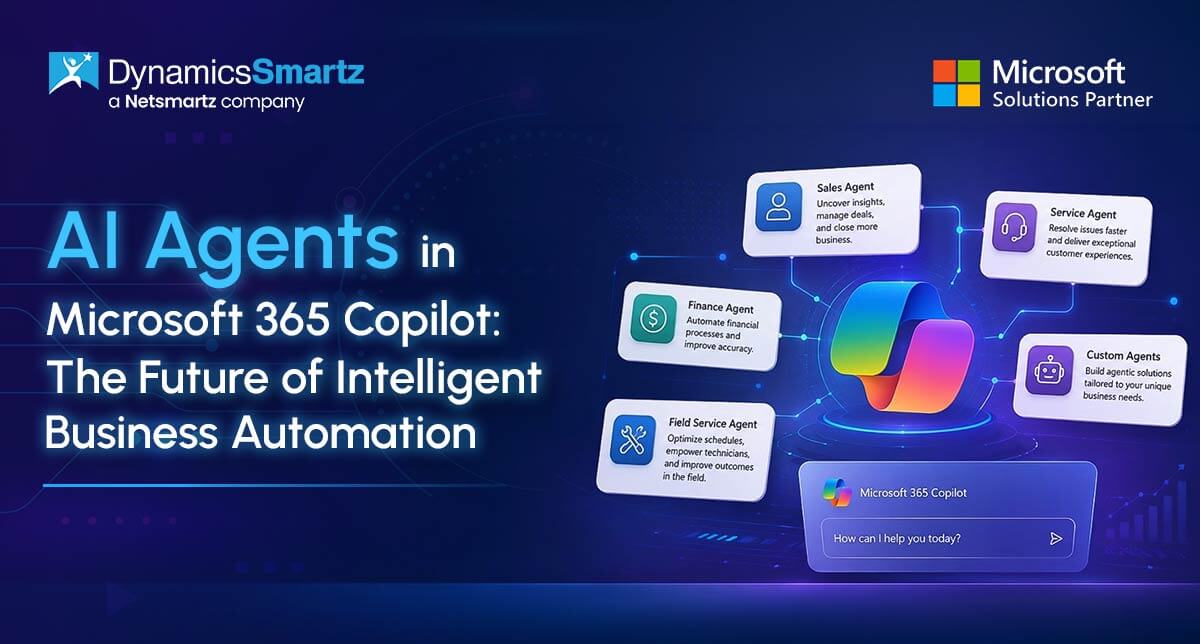
5 AI Agents in Microsoft 365 Copilot Transforming Business Operations Right Now
Not every AI agent works the same way. Some assist employees inside Microsoft apps. Others independently execute workflows, retrieve information, and coordinate actions across systems. Here are five Microsoft 365 Copilot AI agents already delivering results for SMBs running on Dynamics 365.
-
Sales Agent in Microsoft 365 Copilot (Dynamics 365 Sales)
Sales teams spend too much time updating CRM records, searching for customer history, and preparing follow-ups instead of actually selling. The Sales Agent brings together AI-powered insights, conversational intelligence, and seller-centric workflows across Microsoft 365. It embeds intelligence directly into Outlook, Teams, and Copilot chat, helping sellers quickly understand deal context and take action with confidence.
The agent can summarise customer conversations, surface deal risks, draft follow-up emails, recommend next actions, and help teams prepare for meetings using CRM and communication data already stored across Microsoft systems.
The result is cleaner CRM data, faster response times, and more time focused on pipeline growth instead of administrative work. For SMBs running on Dynamics 365 Sales, this is one of the most practical starting points for AI-driven sales automation. -
Customer Service Agent for Dynamics 365 Customer Service
Support teams handle growing ticket volumes across email, chat, and phone while customers expect faster resolutions. Copilot in Customer Service helps service representatives handle multiple interactions, switch between sessions without losing context, and use productivity tools to enhance workflows.
The agent generates case summaries, detects customer intent, recommends responses, surfaces relevant knowledge base articles, and evaluates service quality across interactions. In 2026, these Copilot agentic capabilities extend across case management, customer intent, quality evaluation, and knowledge management, strengthening end-to-end service orchestration.
This agent does not replace support staff. It removes the repetitive work that slows them down. -
Autonomous Agents in Dynamics 365 Business Central
Business Central is more than a finance tool. It is a unified business management platform that connects finance, supply chain, manufacturing, projects, services, and operations in one system. Copilot and autonomous agents work inside that shared environment, turning business data into actionable workflows across departments.
Two autonomous agents are already live and production-ready. The Payables Agent captures invoice data from PDF attachments, matches vendors, suggests account classifications, and creates draft purchase documents for review.
The Approval Agent automates approval workflows based on your business rules, routes transactions to the right stakeholders, tracks status, and records decisions directly in Business Central. Instead of chasing invoices and approvals across emails and disconnected systems, teams can keep operations moving with less manual effort and fewer delays.
In the 2026 release wave 1, Microsoft is making these agents more capable by allowing them to manage more complicated business processes from start to finish, with AI agents helping with important tasks like understanding documents, sorting them, and giving approvals.
For SMBs that want intelligent automation across every business function without stitching together disconnected tools, Business Central with Copilot delivers it. -
Copilot in Dynamics 365 Field Service
Field operations depend on speed, coordination, and accurate information delivered in real time. Field Service combines work order management, resource scheduling, asset tracking, and mobile capabilities designed for frontline workers to help organisations shift from manual and reactive service delivery to connected and data-driven operations.
Copilot generates summaries of work orders in a customisable format and answers natural language questions about your data in a side pane of the web app. Technicians get full asset history, service records, and next steps before they arrive on site. The Scheduling Operations Agent helps dispatchers optimise resource scheduling across the scheduling board, aligning resources to demand and managing operational complexity more effectively.
For construction companies, utilities, and equipment service businesses where downtime directly costs revenue, this is one of the most impactful agents we deploy for clients. -
Custom AI Agents with Copilot Studio
Not every business process fits inside a prebuilt workflow. Copilot Studio lets your team build custom agents connected directly to your Dynamics 365 and Microsoft 365 environments using low-code and no-code tools. No heavy development required.
Teams across your business can create agents for finance approvals, HR onboarding, procurement requests, IT service tasks, and project updates. These agents retrieve information, trigger workflows, answer employee questions, and automate repetitive processes across the exact systems your business already runs on.
This is where Microsoft Copilot business automation gets specific to your operations. If you can describe the process, you can build an agent for it.
Is Your Business Ready? Three Questions to Ask Before You Deploy
Before you activate any agent, run through these three questions with your team.
-
Are you on the right Microsoft 365 plan?
Copilot agents require Microsoft 365 Copilot licensing. Some Copilot Studio agent capabilities run on a separate credit model on top of that. Getting this right before deployment avoids licensing surprises mid-rollout. -
Is your data clean and connected?
Agents work based on the data they can access. If your SharePoint is disorganised or your CRM records are incomplete, the agent’s outputs will reflect that directly. A quick data audit before deployment pays off significantly. -
What is the one workflow you want to automate first?
The biggest mistake businesses make is trying to automate everything at once. Pick one high-volume, repetitive process, run it through an agent, measure the result, and build from there.
Once your agents are up and running, the analytics page in Copilot Studio gives you a clear view of how well your agents are doing, shows where you can save time and money because of them, and provides important performance details. It makes it straightforward to demonstrate ROI to leadership with real data.
How DynamicsSmartz Helps You Deploy AI Agents
Deploying AI agents is not just a technical project. It is a business change. Our team at DynamicsSmartz approaches every deployment in four stages.
-
Business Process Review
We identify the workflows in your organization that are the strongest candidates for automation, based on volume, repetition, and business impact. -
Copilot Studio Implementation
We build and configure custom agents tailored to your industry and internal systems, whether that is construction, manufacturing, field services, utilities, distribution, or professional services. -
Dynamics 365 Integration
We connect agents to your existing ERP and CRM data, so they work with live, accurate information from the start. -
Adoption and Training
We train your team so they actually use the tools. Activation without adoption does not move the needle.
Our goal is not feature activation. It is adoption, consistency, and confidence, turning AI agents from a product feature into a dependable layer of your daily operations.
Want to see which workflows in your business are the right starting point? Book a free consultation.
FAQs
Microsoft 365 Copilot is licensed as an add-on to qualifying Microsoft 365 or Office 365 business plans, while Copilot Studio uses separate consumption-based licensing. The right setup depends on your user count, data environment, and the complexity of the workflows you want to automate. Many businesses start with a licensing assessment before deploying Microsoft 365 Copilot AI agents across their organisations.
Simple AI agents in Microsoft 365 connected to SharePoint or Dynamics 365 data can often be deployed within days. More advanced Copilot Studio agents that automate multi-step workflows or integrate with CRM and ERP systems may take several weeks, depending on process complexity and data readiness.
Copilot agents operate within the permissions and business rules your organisation defines. Admin teams can monitor activity, review logs, and pause or modify agents when needed. For critical workflows like financial approvals or customer record updates, many businesses start with human review checkpoints before enabling broader Microsoft Copilot business automation workflows.
Yes. Many Microsoft 365 Copilot AI agents and Copilot Studio workflows facilitate low-code or no-code deployment. Business users can often configure basic agents without any code. However, more complex workflows related to Dynamics 365, approvals, or ERP processes typically need help with setup to make sure they are secure, properly managed, and can grow over time for smart automation with Microsoft Copilot.
Categories
- United Arab Emirates
- Retail
- Microsoft Dynamics 365 Finance and Operations
- Finance and Operations
- Dynamics Business Central
- Dynamics 365
- Construction365
- Artificial Intelligence
Recent Posts
- Frontier Transformation in Retail: When AI Moves from Insight to Action
- Top Business Central Features Middle East SMEs Are Using to Pull Ahead
- Retail at the Speed of Now: Overcoming Legacy Limits with D365 Finance & Supply Chain Management
- Getting Real Value from Dynamics 365 F&SCM: Smart ROI Strategies for UAE Retail Businesses
- Beyond Out-of-Stock: The Real Cost of “Blind” Inventory for UAE Retail Brands